Operations Solutions for Property Managers: A Buyer's Guide
Evaluating operations solutions for your property management business? Here's what workflow automation software should do, questions to ask vendors, and how to roll it out.
By LeadSimple Team
Automation & Workflows

"I realized I owned a job — 24/7, 365 days a year. So, what can I get the computer to do?"
That's Wolfgang Croskey of Croskey Real Estate, describing a moment most growing property management companies reach eventually. The doors keep coming, the team keeps adding steps to keep up, and somewhere around the third spreadsheet it becomes clear that the operation is running the people instead of the other way around.
That's usually when someone starts shopping for an operations solution. However, "operations solution" covers a lot of ground, and the tools inside that category range from simple checklists to full workflow engines.
This guide walks through what these options are, how to evaluate tools against your own processes, and what to ask before you sign anything.
What is an operations solution for property management?
An operations solution is software that runs the recurring processes of a property management business — move-ins, move-outs, renewals, maintenance coordination, owner onboarding, and collections — as defined, trackable workflows instead of as a loose collection of reminders.
Most of what you'll evaluate falls into three groups:
- General task managers that track assignments but know nothing about property management
- Accounting and portfolio platforms that hold your data but rarely orchestrate the work around it
- Workflow automation software for property managers, built to trigger steps, assign owners, send the communication, and report on where every process stands
The distinction matters because the first two are frequently mistaken for the third. Plenty of teams have tried to streamline property management processes with a general task app, and the tasks do get created. They just don't start themselves, don't email the resident, and don't tell you which of your forty open processes is stalled.
Signs your current setup has outgrown itself
Before comparing vendors, it helps to name the problem you're solving. A few patterns tend to show up together:
- Steps get skipped when someone is out, busy, or new
- The same answer gets retyped to owners and residents dozens of times a week
- Nobody can say how many renewals are mid-process without opening three systems
- Onboarding a new hire means shadowing a veteran rather than following a documented process
- Growth conversations start with "we'd need to hire first"
Ed Riggenbach, who runs Welcome Home Milwaukee with a team of about 20 across roughly 450 doors, put the underlying risk plainly: "property management can burn people out pretty quick." Manual work isn't only slow — it costs you consistency, client trust, and eventually good people.
What property management workflow automation should do
Once you know your gaps, evaluation gets much easier. These five capabilities separate a genuine operations solution from a tool that simply stores your to-do list.
- Trigger work automatically
The process should start itself. A signed lease, a notice to vacate, or a maintenance request should launch the right workflow with the right steps assigned, without anyone remembering to kick it off. - Handle communication inside the workflow
Automating property management tasks matters much less if your team still has to leave the system to write the email or send the text. Look for templated owner and resident communication that fires as part of the process and logs itself against the property or contact. - Connect natively to your property management system
Ask specifically how the tool syncs with your PMS. A native, two-way integration is a different product experience than a middleware connection you have to maintain yourself. - Show you where every process stands
You want a live view of open workflows, overdue steps, and bottlenecks by person or process type. Without reporting, you've automated the work but not the management of it. - Let your team change the process without a developer
Your processes will change. If editing a workflow requires a support ticket or a consultant, you'll stop editing them, and the system will slowly drift away from how you actually operate.
Manual processes vs. automated workflows
A useful way to think about it is to map one process you already run, then compare the two versions honestly.
Here are a few examples:
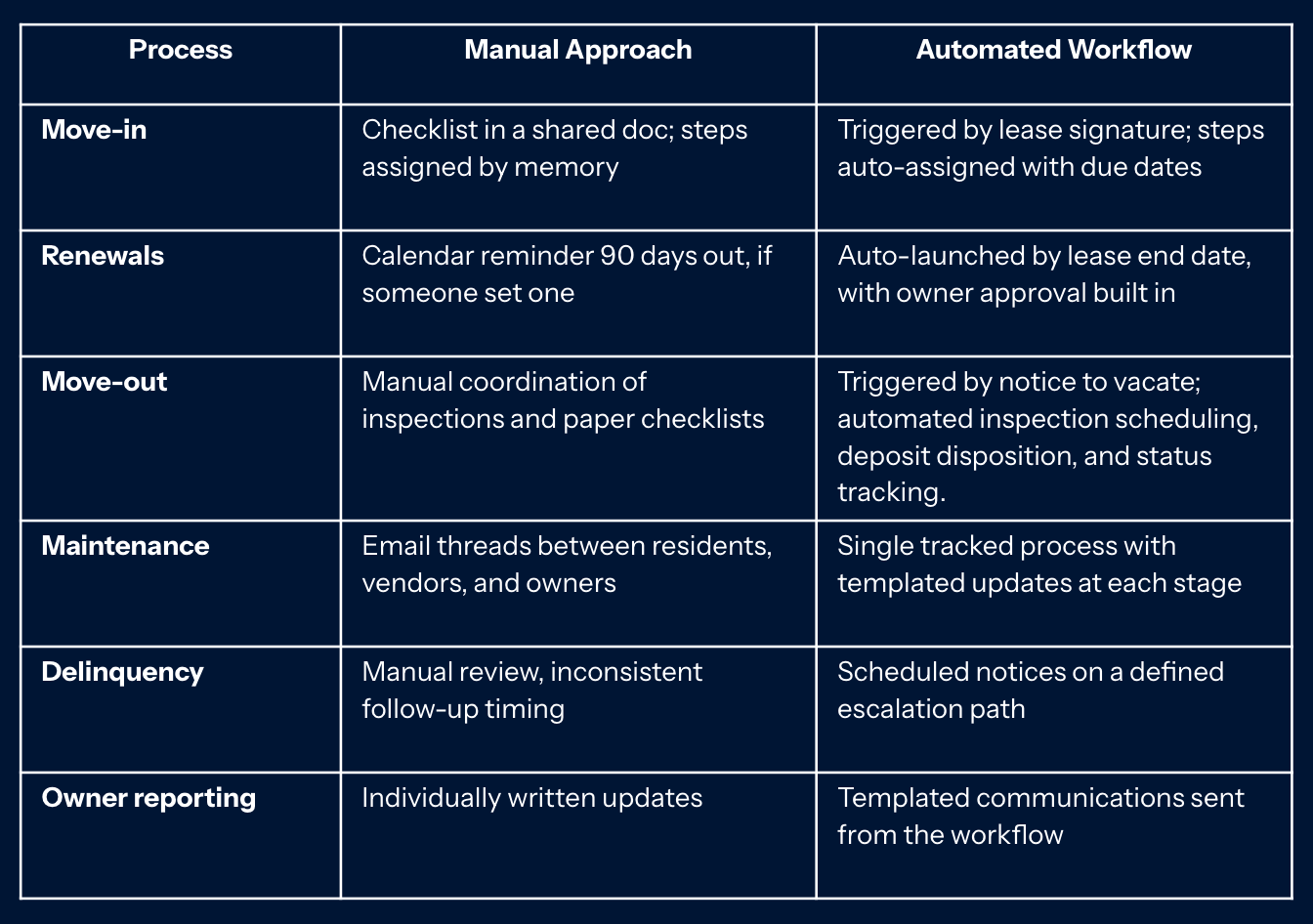
Automation offers more than just time savings. Beyond reclaimed hours, it ensures that every process runs with the same level of precision, whether it's a busy Monday or a quiet holiday week. This consistent operational standard is exactly why Riggenbach describes it as "the biggest benefit to our clients and our team."
Questions to ask before you buy
Getting ready for a software demo? Bring these to the call. They surface the difference between platforms faster than a feature grid will:
- How does this integrate with our PMS, and is the sync native or through a third party?
- Can our team build and edit workflows ourselves, or is that a paid service?
- What does implementation actually involve, and who does the work?
- How does pricing scale: by user, by door, or by product?
- Which reports will show us where processes are stalling?
That second question deserves extra attention. Your business processes will evolve, and if editing a workflow requires a support ticket or a consultant, you'll inevitably stop updating them. The system will then drift away from how you actually operate, undermining the very efficiency you bought it for.
How to roll it out without stalling your team
The most common implementation mistake is trying to automate everything at once. Croskey's advice is worth borrowing: "Start small, or start slow, so that you can go fast."
Pick one high-volume, high-pain process (move-ins and delinquency are common starting points) and get it fully working before you touch the next one. Document it as it exists today, automate that version, then improve it once the team trusts the system. Expect the first process to take longer than the ones that follow, because you're building the habit as much as the workflow.
Where to start
If you're early in the evaluation, skip the feature comparison for a week and map your three most painful processes instead — every step, every handoff, every message. That map becomes your requirements list, your demo script, and your implementation plan.
To see what that looks like in practice, our customer stories walk through how property management teams built theirs, in their own words.
Take control of your operations
The difference between a growing property management company and one that stays stuck in the "owner-operator" trap often comes down to the systems you use to run your daily work. When you move from reactive task management to proactive, automated workflows, you aren't just saving time — you're building a scalable engine for your business.
Ready to see how LeadSimple can transform your property management operations? Book a demo today to see our workflow automation in action and learn how we can support your team’s growth.