Automate your property management agreement workflow
Keep the document, signing progress, and next responsibility together with a repeatable agreement-to-onboarding handoff.
By LeadSimple Team
Automation & Workflows
An owner agrees to hire you. The management agreement goes out. Then the deal waits while someone checks whether both owners have signed, finds the countersigner, and tells operations when to get started.
That gap is worth fixing. A property management agreement workflow should keep the document, signing progress, and next responsibility together. Your team should be able to answer three questions without reconstructing an email thread: Who still needs to sign? Is anything blocking the agreement? Who takes over when it is complete?
LeadSimple’s built-in e-signatures are now free for all customers. Here is how to use them for a repeatable agreement-to-onboarding handoff, starting with the management agreement your company already uses.
Decide what makes an agreement ready to send
Before automating the send, define what your business development manager needs to confirm. That might include the correct property, the agreed service terms, the people authorized to sign, and any internal review your company requires.
Give this check a clear owner. If a fee changes during negotiation, someone needs to verify that the agreement and the underlying record reflect the approved terms. Automating an incomplete record only moves the correction further down the process.
Use your company’s approved agreement and signing requirements. Building the workflow is an operational step; it does not replace review of the contract itself.
Prepare one reusable agreement template
In LeadSimple, you can upload a management agreement PDF as an e-signature template and add the fields each signer needs to complete. Reusing a template gives the team a consistent starting point instead of a collection of nearly identical files.
Map suitable document fields to information already in LeadSimple, such as contact or property details. Review the mapping with a realistic sample record before putting it into regular use. A field can be correctly mapped and still contain the wrong value for a particular agreement.
Lock prefilled values that recipients should not change. Leave an input editable only when your process allows the signer to supply or correct it. Prefill is one-way: information moves from LeadSimple into the document. Do not assume a signer’s changes will update your CRM records.
Route the agreement to the people who must sign
Signer roles let a reusable template refer to an owner or an internal signer without hard-coding a person into every document. Connect those roles to the appropriate contacts or users in the workflow, then set the signing order your agreement requires.
Consider a fictional example: two owners need to sign before your company’s authorized countersigner. Check that both owner contacts are assigned, their email addresses are correct, and the internal role resolves to the right person. Signing order determines when each recipient gets their turn.
LeadSimple can now skip unassigned contact roles, so one template can accommodate different numbers of signers. At least one signer must be assigned. That flexibility makes a pre-send check especially important: a blank optional role may be intentional, while a missing required owner needs attention.
Make sending part of the workflow
Add the e-signature step at the point where the agreement is ready. E-signature tasks send automatically when due in an active workflow, using the connected email account of the task assignee or workflow owner. A future due date schedules the request; draft workflows do not run automated steps.
Test this with a sample agreement before activating it for real owners. Check the sender, recipients, populated fields, and timing. Also test an incomplete record. A required mapped field with no value can block sending, so your team needs to know who fixes it.
The goal is a dependable send at the right point in the process. Keep any human approval your company needs ahead of that step.
Give stalled agreements a clear next action
Once an agreement is out, someone should own the follow-up. Choose a review cadence that fits your sales process and make that responsibility explicit. Do not leave both the BDM and operations assuming the other person is watching.
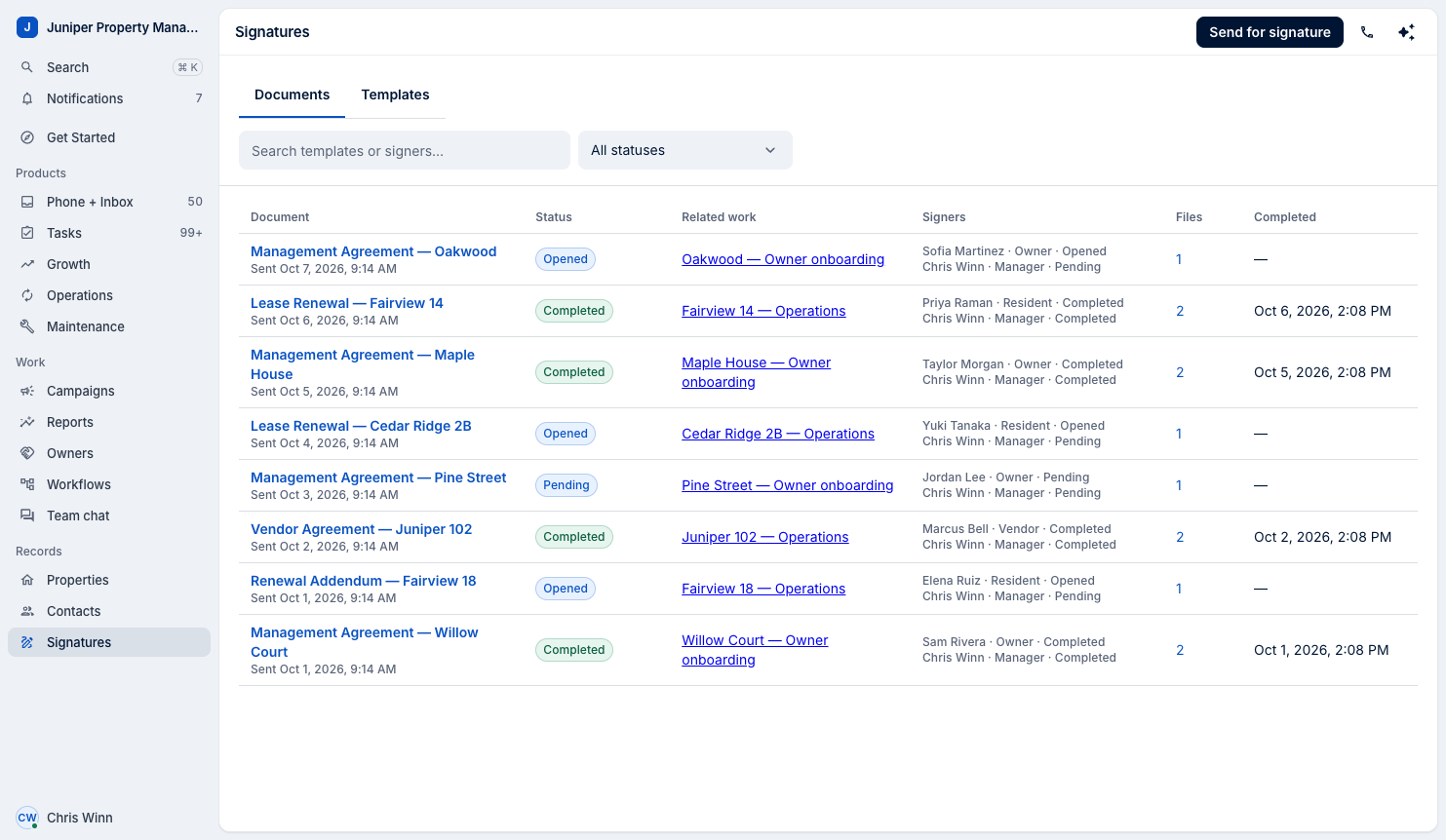
LeadSimple’s Documents view shows request status, individual signer progress, and the related deal or process. Use those details to decide what to do next:
- Sent or opened: Check which signer is next before asking the owner for an update
- Declined, expired, or failed: Investigate the reason and resolve it before treating the agreement as complete
- Completion processing: The signatures are finished, but LeadSimple is still saving the completed PDF
Keep the follow-up useful. A question about the agreement may need the BDM’s judgment; a wrong email address needs a record correction. Repeating the same reminder will not solve either problem.
Define the handoff after the final signature
When everyone has signed, LeadSimple completes the e-signature task and saves the signed PDF with the related deal or process. Build the next responsibilities into your configured workflow so the team knows how to continue.
For a new owner, that handoff might include a welcome message, a named onboarding contact, and a checklist for collecting access details and existing property records. Decide which steps depend on a completed agreement and which can be prepared earlier. These are workflow choices your team makes; a signature alone does not define the whole onboarding plan.
For the broader owner experience around this handoff, see our guide to transforming onboarding.
Start with one agreement and follow it all the way through: ready to send, waiting on signatures, completed, and handed to the teammate responsible for onboarding. If that person can find the signed document and begin the next task without asking the BDM what happened, the workflow is doing its job.
Explore LeadSimple e-signatures, then use the setup guide to build your first agreement workflow.